
Inside the Kiksasa Ecosystem: A Hands-On Walkthrough (Search, Filters, Calendar, Connect)
Jan 12, 2026
Ecosystem, walkthrough
Why This Walkthrough Matters
Many entrepreneurship support organizations run on a mix of spreadsheets, event tools, WhatsApp groups, and manual directories. That setup works, until it doesn’t. Data gets stale, event invites get lost, people slip through the cracks, and no one ever knows what the full ecosystem really looks like.
A digital ecosystem platform changes that. Instead of a scattered patchwork every user or admin sees everything in one place, searchable, filterable, live, and connected.
As argued by ecosystem-experts, “directories” must do more than list organizations; they must enable discovery, collaboration, and real-time engagement. (FasterCapital)
Here’s how the core components work inside the Kiksasa Ecosystem, with concrete steps and best-practice tips for you to get started quickly.
1. Search & Filters - Find What You Need, Instantly
What Works
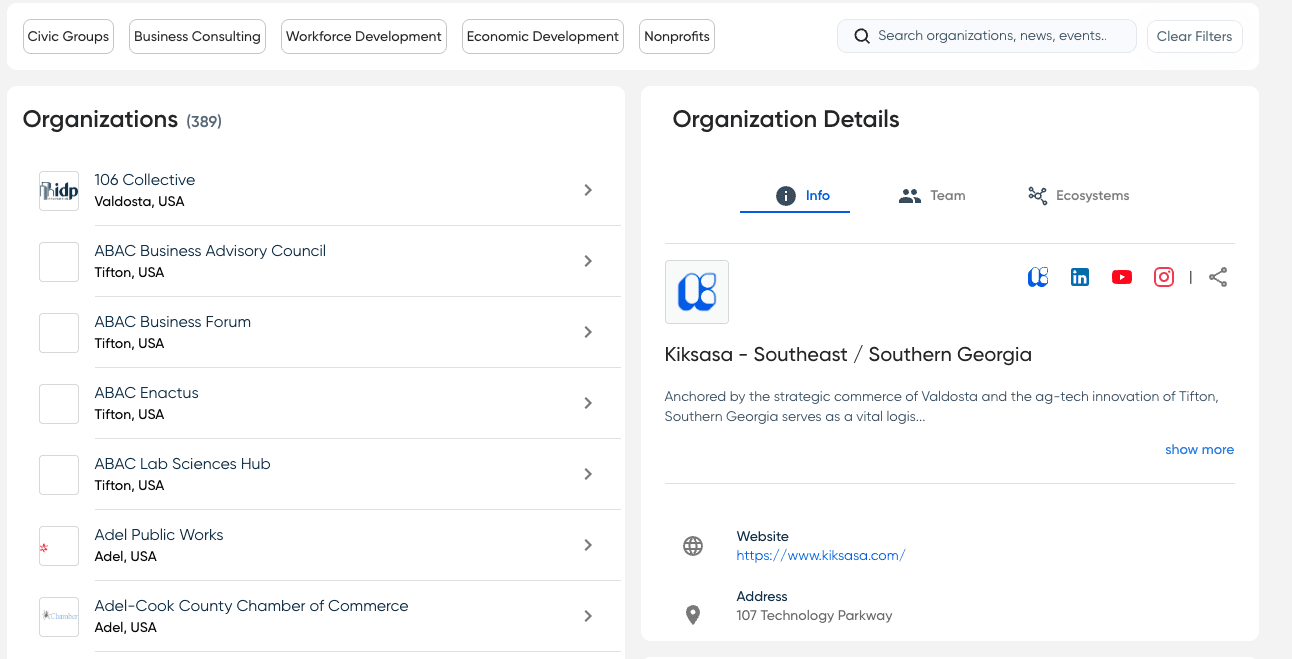
At the heart of Kiksasa is the public directory of programs, support orgs, incubators, accelerators, coworking spaces, investor groups, all tagged, categorized and searchable.
You can type a keyword (e.g. “edtech”, “VC”, “coworking”), and instantly see matching entries.
Use filters, by service type, support type (mentorship, funding, coworking), location (city, neighborhood), language, stage (idea / pre-seed / growth), etc.
Once filtered, you get a clean list, and a map view that shows where each org is located. Then you can click any entry to view its full profile: contact info, description, programs offered, links, events, founder reviews, and more.
Why it matters: According to research, a good directory needs not just data collection — but intuitive search and filtering, so users can navigate easily without getting overwhelmed. (FasterCapital)
How To Try it Now
Open the Ecosystem map/directory.
In the search bar, type the domain you’re interested in (e.g. “health-tech”, “early-stage funding”, “coworking”).
Use the sidebar filters to narrow down by city/region, support type, or stage of growth.
From the filtered list, click an organization, check its programs, contact links, upcoming events.

2. Calendar & Events - Keep Everyone In Sync
One big limitation of fragmented systems is that events get lost. Separate Google calendars, isolated invites, or scattered WhatsApp threads make it hard to track what’s happening and where. A unified event calendar solves this.
What You Get
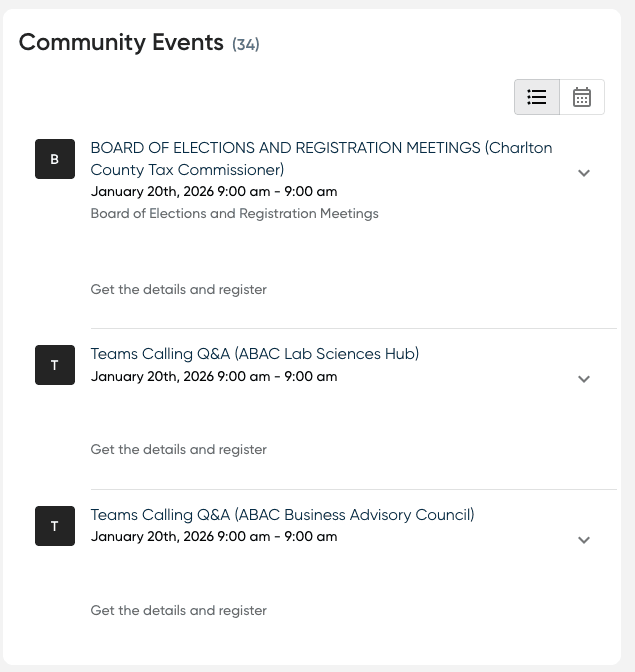
A community-wide events calendar with all public and private events (workshops, pitch nights, meetups, office hours, webinars) listed.
Filters for event type (online / offline), date, location, topic.
Option to RSVP or register (depending on how organizers set it up).
One-click “Add to calendar” (Google, Outlook, Apple), so events go directly to your personal calendar.
Notifications and reminders for attendees.
This mirrors the functionality recommended by community-platform specialists: seamless event management, integrated calendars, and easy discovery to avoid “which Zoom link was that?” confusion. (Thrico)
How To Use It Today
Scroll down to the Community Events Module
Browse the upcoming events or search for an organization.
Click an event → check details (agenda, time, location/URL).
If interested → hit RSVP / Register → then use Add to Calendar.
Benefits for organizers: no more juggling multiple calendars, reinventing registration forms, or wrestling with spreadsheet-based attendee lists.
3. Connect & Community - Transform Data Into Real Relationships
Directories or event calendars are useful. But real ecosystems thrive when people connect, founders with mentors, entrepreneurs with peers, programs with collaborators.
Kiksasa goes beyond listing by supporting connection flows in Kiksasa Hub: member profiles, messages/contact links, and community tools.
Core Features
Member / Organization profiles - each entity (founder, mentor, incubator) has a persistent profile that follows them across programs.
Direct contact links or messaging/connection options - enabling founders or organizations to reach each other directly.
Cross-program identity - one individual can belong to multiple programs, cohorts, or orgs without separate accounts.
Visibility controls & privacy - opt-in data sharing; organizations control what’s public or private.
Tracking relationships over time - mentor–founder pairings, collaboration histories, alumni paths.
4. Why This Structure Works - From Directories to Living Ecosystems
Static directories - spreadsheets, PDF lists, outdated pages, are only snapshots. They decay fast. A digital ecosystem with search, events, and connection tools becomes living infrastructure.
Key benefits, backed by research and field examples:
Improved discovery and resource matching: Good directories reduce the friction for entrepreneurs to find what they need - mentors, coworking, funding, peers. (FasterCapital)
Lowered overhead, easier maintenance: Instead of manually emailing, copying, updating spreadsheets, admins rely on a platform. That saves time and reduces errors. Local-foundation, a similar platform, estimates 40–70 hours/week saved on admin when switching from fragmented tools. (local.foundation)
Better engagement and accountability: When events, profiles, and communication are centralized, participation improves, follow-ups work, and relationships are more trackable. Event-management features (calendar + registrations + reminders) dramatically reduce “no-shows.” (Thrico)
Scalability: As a region grows — more incubators, mentors, ventures, a platform handles scale. New entries get indexed fast; filters and search make navigation manageable even for hundreds or thousands of organizations.
5. What to Check When You Sign Up - Quick Pre-Launch Checklist
Before you launch or onboard your community on Kiksasa Ecosystem (or any similar platform), make sure to:
Gather your existing data, if you have it: directory lists, event pipelines, mentor and organization contacts, ideally in CSV or spreadsheet form. This helps with clean import.
Define categories/tags: by program type (incubator, coworking, accelerator), support type (mentorship, funding, events), sector (health-tech, ed-tech, agritech), region/neighborhood, consistent tagging is critical for useful filters.
Plan onboarding communication: send an announcement to your community explaining the switch, how to claim or verify their profile, and encourage them to complete their entries.
Map event workflows: once live, integrate your existing event calendar(s), or start using the built-in calendar to publish new events, track RSVPs, and send reminders.
Establish admin roles: who updates data, who approves new entries, who handles member requests, who tracks analytics and drives engagement.
Final Thoughts - From Fragmented Tools to Connected Ecosystems
For founders, programs, and ecosystem builders, switching from disconnected tools to a unified platform isn’t just incremental improvement. It’s transformation: from fragmented, brittle workflows to a living, networked community.
With the Kiksasa Ecosystem, the vision many have described, an interconnected, searchable, active startup ecosystem map, becomes real.
Whether you’re a first-time founder looking for support, a civic side seeking visibility, or a program admin trying to reduce manual overhead and improve coordination, this structure helps.\
Contact Kelly Flynn or Tim Chalk to arrange a demo and discuss further: info@kiksasa.com or visit kiksasa.com.
Some Important Links:
Kiksasa Ecosystem - https://www.kiksasa.com
Atlanta Ecosystem Guide - https://atlanta.kiksasa.com
Startup Atlanta - https://startupatlanta.com
Contact us for a demo
We'd love to give you a tour!
We will never spam your Inbox.
Ready to transform your operations?
Proud Member of:
Socials









Kiksasa, LLC © 2026